
Get started
Install the addon, open the console, learn the keys. Five minutes, no programs outside the game.
Install
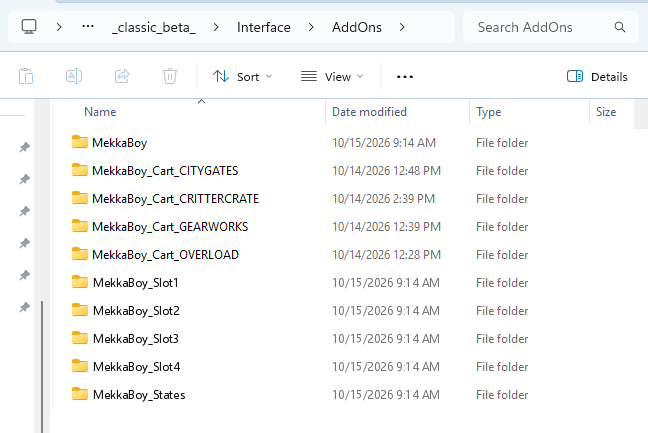
Unzip the download and put every folder in it into your AddOns folder, next to each other. On Windows that is usually C:\Program Files (x86)\World of Warcraft\_classic_beta_\Interface\AddOns. On a Mac it is /Applications/World of Warcraft/_classic_beta_/Interface/AddOns. If you use the CurseForge app, WowUp or Wago, they do this for you.
Start the game client. If it was already running, close it and start it again. A /reload does not pick up new folders.
You should have these folders: MekkaBoy, MekkaBoy_Slot1 through MekkaBoy_Slot4, MekkaBoy_States, and one MekkaBoy_Cart folder per included game (CITYGATES, CRITTERCRATE, OVERLOAD, GEARWORKS).
Open it
Type /mb, or click the button on the minimap. Click the screen or press Enter to switch on. Esc pauses. Esc again puts it away. Hover any button on the console to see its key.
While the console is open it has the keyboard, so your movement keys and action bars will not fire until you put it away. Print Screen still works. It will not open while you are in combat.
The shelf
Press Select while the console is off or paused to see your cartridges, or type /mb carts. Each cartridge keeps its own saves, memory valves and resume point. The console remembers which one you played last.
Keys
The default keybinds are listed below. /mb keys prints this list in game. /mb bind a K changes a key. /mb bind reset puts them back.
| D-pad | Arrow keys, or WASD |
| A / B | X / Z |
| Start / Select | Enter / Backspace |
| L / R (Advance games) | Q / E |
| Fast-forward (hold) | Tab |
| Rewind (hold; Game Boy games) | ` (backtick) |
| Load / save memory valve 1-4 | F1 - F4 / Shift + F1 - F4 |
| Volume | = and - |
| Turbo A / Turbo B | C / V |
Saving
Games save the way they did on the original hardware. The save, the four memory valves and the resume point are stored in the addon's saved variables, which the game client only writes to disk when you log out or /reload. If the client crashes, anything since the last write is gone. Reload after a session you care about.
Right-click a valve to save a state, left-click to load it. Rewind holds the last 40 seconds.
Interruptions
Entering combat puts the console away; the game pauses and is kept. A ready check, a dungeon or battleground queue, a summon, a resurrect offer, a group invite, a duel, a trade window and your flight landing each pause the game and show why on the screen. You can turn any of these off under Options, AddOns, MekkaBoy, or with /mb options. A whisper leaves a note on the status plate and does not pause anything.
Add your own games
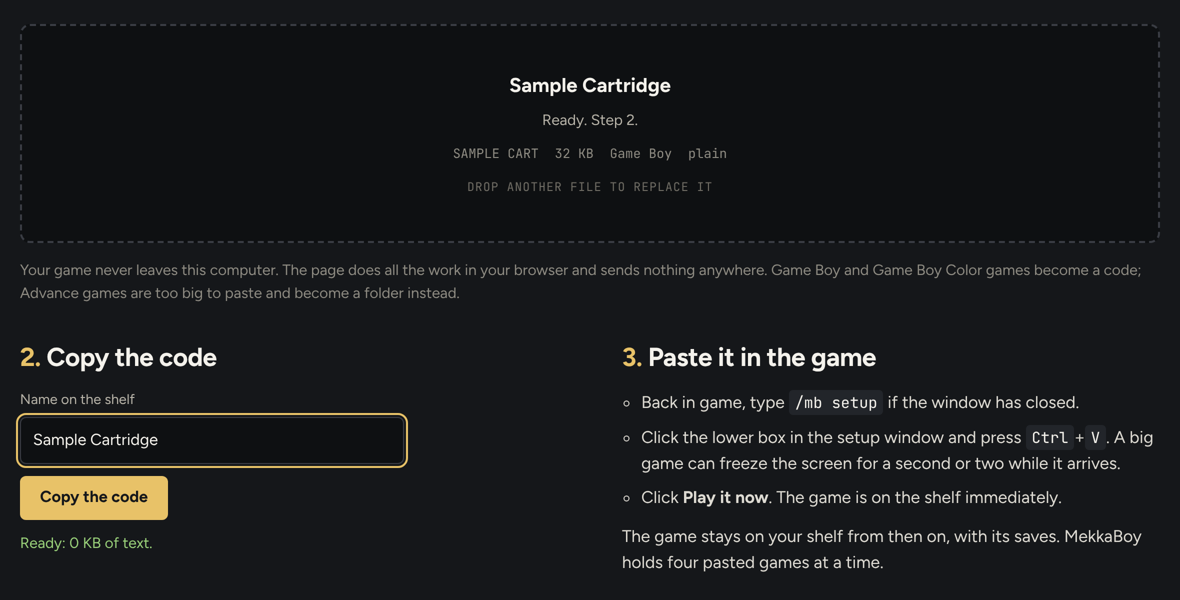
A game ROM you own goes on the shelf through the Workshop, a page that runs in your browser. Drop the file on it: a Game Boy or Game Boy Color game becomes a code you paste into the /mb setup window in game, and an Advance game becomes a MekkaBoy_Cart folder you put next to the MekkaBoy folder before starting the client. Nothing is uploaded. Games you add play without sound unless you record a soundtrack pack from your copy; the FAQ explains how.
If the shelf says "no cartridge"
The cartridge folder is one level too deep. MekkaBoy_Cart_NAME has to sit next to the MekkaBoy folder, inside the AddOn folder, with the .toc file directly inside it, not inside the folder your unzipper created around it. Move it up one level and start the client again. This is the cause of most "it doesn't see my game" reports.